




Product Specifications
- Thanks to the self-adaptive design, OPT 1 can be used as either an input or output connector, depending on its connected device
- Reduce the delay from the input to receiving card to 20 lines when the low latency function and Bypass mode are both enabled
- An internal input source or external Genlock can be used as the sync source to ensure the output images of all cascaded units in sync
- The mosaic source is composed of two sources (2K×1K@60Hz) accessed to the OPT 1
- Work with software to support brightness and chroma calibration on each LED, effectively removing color discrepancies and greatly improving LED display brightness and chroma consistency, allowing for better image quality
- Up to 4 units cascaded for image mosaic
Available models:
- DS-D42V06-N
- DS-D42V06-N(V2)
Processing Performance
- Brightness Control : 1-100 Levels
- Frame Frequency : 25HZ-60HZ
- Grey Level : 256
- Display Color : 1 Billion
- Processing Depth : 8bit
- Image Scaling : Support
Product Model
- Product Model : DS-D42V06-N
Chassis
- Chassis Height : 1.12U
- Chassis Width : 351.2mm
Product Type
- Product Type : LED Controller
LED Controller Power
- Average Consumption : ≤28W
- Number Of Power Interfaces : 1
- Power Interface Specifications : 100-240V~,1.6A,50/60Hz
General
- Working Temperature : -10°C ~ 45°C
- Storage Humidity : 10% ~ 95%
- Working Humidity : 20% ~ 90%
- Storage Temperature : -20°C ~ 70°C
- Packaging Size (W × H × D) : 565.0mm×175.0mm×450.0mm
- Net Weight : 4kg
- Gross Weight : 6.8kg
- Dimensions (W × H × D) : 483.6mm×351.2mm×50.1mm
- Packing List : DS-D42V06-N*1,Power Cable *4,Ethernet Cable *1,HDMI Cable *1,HDMI TO DVI Cable *1,USB Cable*1
Audio Input
- Audio Input Interface : (S)1
- Audio Input Interface Type : HDMI inline
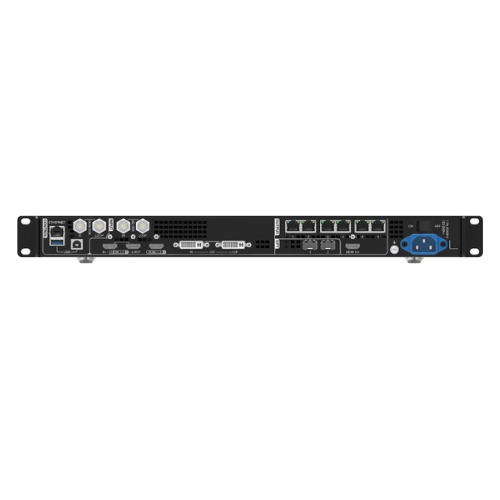
Video Input
- Video Input Interface : (S)4
- Video Input Interface Type : 2 HDMI1.3+1 3G-SDI+1 DVI
- Max. Input Resolution : 1080P
- Video Input Resolution : HDMI1.3 interface
Supports 1920 x 1200@60Hz Video source input.
Supports HDCP1.4. Not supporting interlaced signal input.
Support custom resolution.
Custom maximum width: 3840 (3840 x) 648@60Hz )
Custom maximum height: 2784 (800 x 2784@60Hz )
Support front-end device push input: 600 x 3840@60Hz
HDMI 1.3-1 supports LOOP loop output.
SDI interface
Supports ST-424 (3G), ST-292 (HD), and ST-259 (SD) standard video source inputs.
Single channel support 1920 x 1080@60Hz Video source input.
Support de interlacing processing.
Input resolution and bit depth settings are not supported.
Supports 3G-SDI Loop output.
DVI interface
Supports 1920 x 1200@60Hz Video source input.
Supports HDCP1.4.
Interlaced signal input is not supported.
Support custom resolution.
Custom maximum width: 3840 (3840 x) 648@60Hz )
Custom maximum height: 2784 (800 x 2784@60Hz )
Support front-end device push input: 600 x 3840@60Hz
DVI supports LOOP loop output.
- Video Input Processing Characteristics
Processing depth 8
Sampling format
RGB:444
YUV:4:4:4
YUV:422
Video Output
- Max. Output Resolution : 3.9 Million
- Loading Capacity For Video Output To LED
Single port with load 650000
Width 1~10240
Height 1~8192
- LED Loading Interfaces : 6
- LED Loading Interface Type : RJ45
- Number Of Video Ring Pass Output Interfaces : 2
- Video Looping Output Interface Type : HDMI 1.3+DVI
- Video Looping Output Resolution : 1920×1200@60Hz
Audio Output
- Audio Output Interface : (S)NA
- Audio Output Interface Type : NA
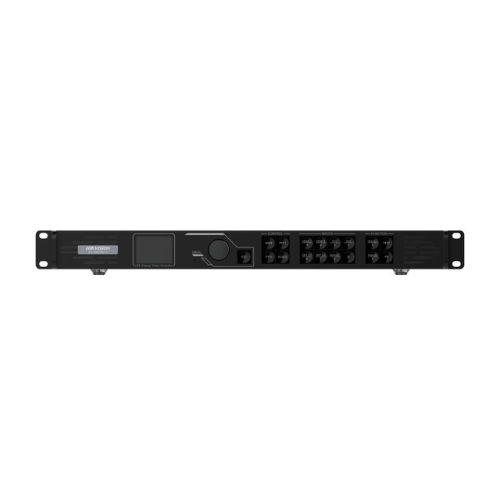
Front Panel
- Screen : LCD screen
- Key :
“knob\”: Select menus, adjust parameters, and confirm operations.
\”ESC\”\”: Exit the menu or cancel the operation.
\”MAIN/PIP 1/PIP 2\”\”: Layer on, off, and layer state display.
\”SCALE\”\”: Full screen auto zoom shortcut key, adaptively fills the window with the lowest priority to full screen.
\”PRESET\”\”: Enter the scene settings menu.
\”TEST\”\”: Enter the test screen settings menu.
\”FREEZE\”\”: Freeze the output screen.
\”FN\”\”: Customizable function shortcut key.
\”HDMI1/HDMI2/DVI/SDI\”\” Input source status display, supporting one click switching of the main window input source.”
- Pilot Lamp
“MAIN/PIP 1/PIP 2\”: Long blue light: The layer is turned on.
Blue flashing: The layer is currently being edited.
Long white light: The layer is not turned on.
\”SCALE\”\”:Long blue light: Full screen automatic scaling is enabled.
Long white light: Full screen auto zoom is not enabled.
\”HDMI1/HDMI2/DVI/SDI\”\”: Long blue light: There is an input source connected.
Blue flashing: No input source connected, already used by the layer.
Long white light: No input source connected or input source abnormal.
Control Interface
- Control Network Port :
“1 RJ45, 10M/100M/1000M adaptive Ethernet ports
Connect and control the computer or router.”
- 3D Interface : NA
- IR Input : NA
- Serial Interface : 1, 1 debug serial port (RJ45)
- Light Perception : LIGHT SENSOR:Connect the optical probe to obtain ambient brightness, which can achieve automatic adjustment of screen brightness.
- USB : 2 x USB 2.0
- On-Off : Switch